
Every time you mix two different data types in one expression, SQL Server has to make a decision. It doesn’t split the difference or throw an error. It picks a winner, converts the other value to match, and carries on without telling you.
Most of the time this is invisible and harmless. Occasionally it changes your results. Every so often it quietly disables an index and nobody notices until a report that used to run in two seconds is taking two minutes.
SQL Server ranks every data type on a fixed precedence list. When two different types meet in a comparison or an expression, the lower-ranked one gets converted up to the higher-ranked one.
Here is a simplified version of the order, highest to lowest, for the purposes of this post:
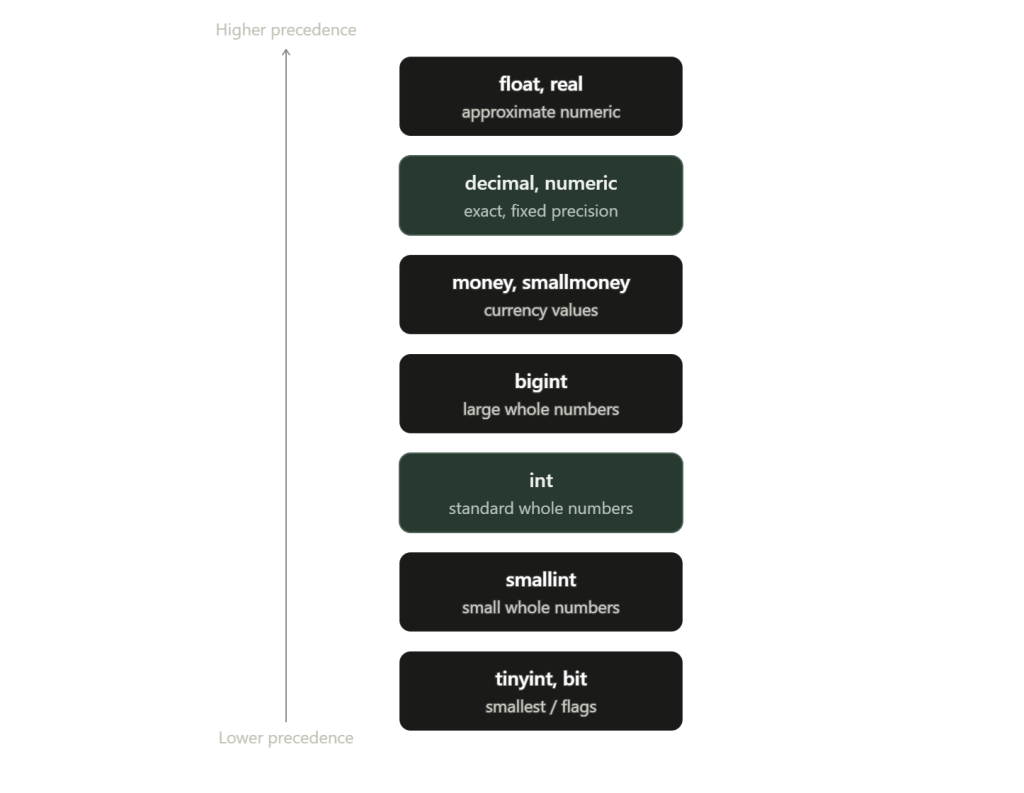
Two things worth noticing straight away. First, it’s a strict order, not a negotiation, whichever type is higher always wins regardless of which side of the expression it’s sitting on. Second, and this trips people up constantly, every numeric type outranks every string type. INT beats VARCHAR. Always.
Trivial Example
If you’ve got a sandbox SQL instance, give these queries a run:
SELECT 10 / 3.0

SELECT 10 / 3
Expectation
10 divided by 3 should give 3.333333…
Reality
The top query works as expected, even if behind the scenes it is transforming 10 from an INT into 10.0, a DECIMAL. The second one however, returns simply 3. Mathematically incorrect, logically sound. Both sides are INTs, neither outrank the other so SQL Server performs integer division.
These kind of “erroneous” results get noticed quite easily, a human seeing 10 / 3 = 3 is going to know something is up, but what happens when the effect of this secret conversion happens behind the scenes?
Costly Mistakes
First, let’s create a table:
CREATE TABLE ExampleCustomers
(
    AccountCode VARCHAR(15) NOT NULL PRIMARY KEY

    ,CustomerName VARCHAR(100) NOT NULL
);
GO

INSERT INTO ExampleCustomers (AccountCode, CustomerName)

VALUES ('00423', 'Marlowe & Finch Ltd')

    ,('01187', 'Hallow Point Books')

    ,('10234', 'Bramwell Fitness Studio')

    ,('10235', 'Quillon Design Co')

    ,('20099', 'Aster & Vine')

    ,('20450', 'Northgate Motors');
*NOTE: AccountCode is the primary key, so it’s automatically backed by a unique index.
Now let’s run the same lookup two ways:
SELECT CustomerName
FROM ExampleCustomers
WHERE AccountCode = '10234';

SELECT CustomerName
FROM ExampleCustomers
WHERE AccountCode = 10234;
Expectation
Same table, same value, just typed differently the second time, a string literal versus a bare number. Both should run identically and use the primary key index to go straight to the matching row.
Reality
Check the execution plan on each and the “gotcha!” isevident immediately:
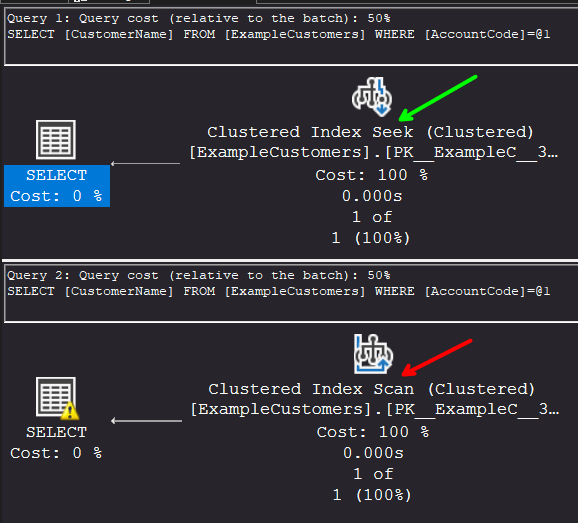
The first query does a clean Index Seek, exactly what you’d want on a primary key lookup. The second does an Index Scan, reading every single row in the table and converting each AccountCode value in turn to check for a match. On six rows you’d never notice. On six million, that second query is the reason your dashboard timed out.
Why
10234 without quotes is an INT literal. AccountCode is VARCHAR. INT outranks VARCHAR on the tower, so SQL Server has to make the comparison in INT terms, and the only way to do that is to convert AccountCode to INT for every row before it can compare anything. That conversion gets wrapped around the indexed column itself, not the literal, so the index can no longer be used to seek. SQL Server falls back to scanning the whole table and converting as it goes.
This is the opposite of what most people assume. The instinct is that the little numeric literal is the thing being changed to fit the column, but precedence doesn’t care what looks more “column-like”, it only cares about the ranking. NUMERIC always outranks STRING, so the column loses, not the literal.
The fix
Don’t let precedence make the decision for you, especially on anything that touches an indexed column. Match your literals and parameters to the actual column type explicitly.
If the value is coming from application code rather than a hardcoded literal, the equivalent fix is making sure the parameter itself is declared as VARCHAR, not INT, so ADO.NET or Entity Framework or whatever’s building the query isn’t sending a numeric parameter type against a text column. A CAST on the literal works too if you can’t control the parameter type, but fixing the parameter is the more permanent answer since it stops the problem before the query is even built.
Oh, and as always, don’t forget to clean up after yourself:
IF  EXISTS
(SELECT * FROM sys.objects WHERE object_id = OBJECT_ID(N'[dbo].[ExampleCustomers]') AND type in (N'U'))
DROP TABLE [dbo].[ExampleCustomers]
GO

 Data Luthier
Leave a comment