
I think at some point, it’s happened to us all who work in a tech profession, a family member or a friend has an issue and turns to us to help. I’m a data engineer by day so IT isn’t really my strong point, but I know enough to be dangerous.
A friend asked me to “break” into an old laptop of theirs to retrieve some old photos. Normally I’d load into Ubuntu from a bootable USB and copy the files across, boot the drive in question was BitLocked. Game over? Maybe. Maybe not.
Windows has many hidden doors — some are there for accessibility, others unintentionally enable powerful bypasses. One such method is the Sticky Keys hack. It allows you to gain elevated command-line access at the Windows login screen without knowing a user’s password.
Let’s walks through the theory behind the trick, the practical method, alternative use cases, and, importantly, the ethical implications of publishing such information.
The Theory
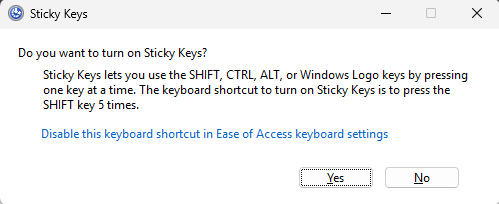
At its core, this hack is about privilege escalation. Sticky Keys (sethc.exe) is an accessibility program that launches when you press the Shift key five times on a windows machine. It’s designed to help users with physical impairments to simplify key combos, and as users may need this assistance to type their password, it is available at the log in screen.
However, sethc.exe is just an executable file located in C:\Windows\System32. If someone has physical access and can boot into a recovery environment, they can replace sethc.exe with cmd.exe — the Windows Command Prompt.
From there, pressing Shift five times launches a command shell with SYSTEM-level privileges, which is the most powerful user context on Windows.
The Method
Warning: This is for educational and defensive purposes only.
- Boot into Windows Recovery (via install media or repeated power-offs).
- Open Command Prompt (Shift+F10).
- Back up Sticky Keys:
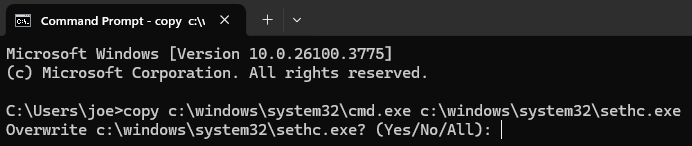
copy c:\windows\system32\sethc.exe c:\ - Replace it with Command Prompt:
copy c:\windows\system32\cmd.exe c:\windows\system32\sethc.exe - Reboot.
- At the login screen, press Shift 5 times.
- A Command Prompt window should now open instead of Sticky Keys — with full SYSTEM privileges.
- You can now reset passwords, create new accounts, or access files.
In my use case I added a new System Admin account, set the username and password and logged into the machine. From there I had access to the drives on the machine and could retrieve the old photos.
Alternate Use Cases
The technique isn’t limited to sethc.exe. Any executable that runs pre-login (especially those linked to accessibility or network setup features) can be swapped out for tools like:
- PowerShell: For automation or scripted access
- Task Manager: To explore system processes
- Custom payloads: Security research, data collection, or remote backdoors (ethics dependent)
Potentially swappable executables include:
utilman.exe(Ease of Access button)osk.exe(On-Screen Keyboard)narrator.exe(Narrator)
BitLocker’s Role — Or Lack Thereof
This trick raises a critical question: doesn’t BitLocker prevent unauthorized file access?
Yes — if BitLocker is enforced. But in many real-world scenarios:
- Systems are suspended or pre-auth booted (e.g., after sleep/hibernation).
- TPM-only configurations unlock disks before login.
- Recovery environments may access the disk if no startup PIN is used.
If you can write to the disk (even just to System32), you can set this up — BitLocker is not always a guarantee of full-disk protection in practice.
Microsoft’s Response
I reported this issue to Microsoft through the MSRC (Microsoft Security Response Center). Their reply:
“Thank you for contacting the Microsoft Security Response Center (MSRC).
In general, MSRC does not consider issues that require physical access to be exploited as security vulnerabilities.
If the issue allows for direct code execution bypassing the logon screen of a locked computer we may consider that a security vulnerability on a case-by-case basis.
In addition, if the PoC requires elevated privileges to trigger, such as needing to be able to access and modify files in system32, this will not meet the bar.
As such, this thread is being closed and no longer monitored. We apologize for any inconvenience this may have caused.”
In other words: if physical access is required, it’s not their concern.
The Moral Dilemma of Sharing
Publishing techniques like this always raises a question: is it ethical?
In this case, I believe the answer is yes — and here’s why:
- Disclosure was attempted and rejected. Microsoft has deemed it outside their threat model.
- Awareness is protection. IT admins and security teams must understand what physical access can lead to, and not place blind faith in BitLocker or the login screen.
- Hardening is possible. Secure boot, BitLocker with pre-boot PINs, BIOS passwords, disabling recovery environments — these all mitigate this.
- Ethical Use Cases. I used this method to retrieve some locked files that genuinely belonged to the user, sharing it may enable others to do the same.
Security through obscurity is no security at all. If this post helps even one person lock down their machine more thoroughly, it’s worth it.
Final Thoughts
This is a reminder: if someone has physical access, they can own your system — unless you’ve taken strong steps to prevent it.
Don’t assume BitLocker protects everything. Don’t assume login prompts mean the system is safe. And above all, don’t assume old tricks like the Sticky Keys hack are gone — they’re still walking through the front door.

 Luthier
Leave a comment