
SQL Server mostly behaves as you’d expect—until it doesn’t. In this post, I’ll show you some of its stranger behaviors that can trip you up if you’re not watching closely. These are the quirks that make you say, “Wait, what?”
You can copy and paste everything here into your own environment to see the oddities for yourself (and don’t worry we’ll clean up at the end)
1. NULL Does Not Equal NULL
Let’s create a simple table:
CREATE TABLE NullTest (
    A INT NULL,
    B INT NULL
);

INSERT INTO NullTest (A, B)
VALUES (NULL, NULL);
Expectation
Now run the following, but before hitting EXECUTE, what do you expect to see, NULL = NULL, right?
SELECT * FROM NullTest WHERE A = B;Reality
No rows are returned.
Why?
In SQL, NULL represents an unknown value. So comparing two unknowns doesn’t give you a “true” result—it gives you another “unknown,” which SQL will always consider as FALSE. The simplest way to picture it is to imagine it’s your birthday and you’ve got 2 surprise gifts, you have no idea what’s in each box, you wouldn’t just presume they contained the same thing.
2. DISTINCT Can Be Fooled by NULL
Another simple table:
CREATE TABLE DistinctNulls (
    Col1 INT NULL
);

INSERT INTO DistinctNulls (Col1)
VALUES (NULL), (NULL), (1), (1);
Expectation
We’ve got 4 rows in this table but how many distinct values? Run the following and see if you’re correct.
Query
SELECT DISTINCT Col1 FROM DistinctNulls;Result
Col1
-----
NULL
1
Seems normal, 4 values, 2 distinct values so 2 rows returned… until you ask: “How many rows are in that result set?”
You might expect 2, after all, we can see 2 rows above, lets count them and find out:
SELECT COUNT(DISTINCT Col1) FROM DistinctNulls;Reality
The result is 1.
Why?
The DISTINCT in a SELECT shows multiple NULLs as a single row, but COUNT(DISTINCT Col1) ignores NULLs altogether. So while NULL is distinct for display, it’s invisible for counting. Odd, but important to know so you don’t presume there are no NULLs in your data when counting.
3. TOP Without ORDER BY Is Not Deterministic
Setup
CREATE TABLE TopTest (
    Id INT PRIMARY KEY,
    Name NVARCHAR(50)
);

INSERT INTO TopTest (Id, Name)
VALUES (1, 'Bravo'), (2, 'Alpha'), (3, 'Delta'), (4, 'Charlie');
Expectation
SELECTing the TOP 3 rows should return the records for Primary Keys 1, 2 and 3 right?
Query
SELECT TOP 3 Id, Name FROM TopTestPerfect, the result is (probably) exactly what we expected.
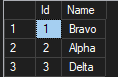
However, what if someone adds an INDEX to the table without our knowledge. Run the below to simulate this:
CREATE NONCLUSTERED INDEX [NCI_Name] ON [dbo].[TopTest]
(
	[Name] ASC
)
ON [PRIMARY]
GO
Now let’s run that exact same SELECT statement again:
SELECT TOP 3 Id, Name FROM TopTestReality?
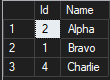
The SELECT statement has used the INDEX and returned the results ordered by Name instead.
Why?
Without a specific ORDER BY declaration, SQL Server is free to return any arbitrary two rows. Contrary to popular belief, there’s no implied order in a table,
How to Fix It
Always get into the habit of declaring a specific ORDER BY clause.
SELECT TOP 2 Name FROM TopTest ORDER BY Name;4. LIKE Doesn’t Always Respect Collation (Especially with =)
Setup
CREATE TABLE LikeWeirdness (
    Val VARCHAR(10) COLLATE Latin1_General_CI_AS
);

INSERT INTO LikeWeirdness (Val)
VALUES ('abc'), ('ABC');
Query A
SELECT * FROM LikeWeirdness WHERE Val = 'ABC';Returns both rows (case-insensitive collation).
Query B
SELECT * FROM LikeWeirdness WHERE Val LIKE 'ABC';Still returns both rows.
But now, try this:
SELECT * FROM LikeWeirdness WHERE Val COLLATE Latin1_General_CS_AS LIKE 'ABC';Only one row returned!
Why?
LIKE can behave differently under binary or case-sensitive collations. = and LIKE often act the same—until you apply a case-sensitive or accent-sensitive collation override, and then it can bite.
Now obviously the above is an extreme example to make a point, but hopefully it raises awareness to the fact you might not always know the collation of the SQL Server DB you’re working with, and it might help explain unexpected query results,
Conclusion
Something you may have noticed about all of the above, is that they are all examples of SQL Server functioning correctly. So yes, the title is a little misleading, but the purpose of this post is to raise awareness, especially to new Developers, that SQL Server doesn’t always execute things the way we expect. Knowing these behaviors may help troubleshoot and explain results this appear odd on the surface.
Oh yeah, and as promised, here’s the code to clean up the objects we made along the way:
DROP TABLE IF EXISTS NullTest;
DROP TABLE IF EXISTS DistinctNulls;
DROP TABLE IF EXISTS TopTest;
DROP TABLE IF EXISTS LikeWeirdness;
 Luthier
Leave a comment